

|
FhSim
3.1.0
Marine systems simulation
|
|
|
FhSim
3.1.0
Marine systems simulation
|
Class modelling the operation of danish seining.
 Collaboration diagram for Seine operation:
This class controls the operation of danish seining, by giving control input to the vessel, aswell as controlling the SeineConnector object, which is the buoy used in the operation. It controls the warp lengths, if the buoy is set and in which position, the speed of the vessel, and the desired heading of the vessel. Its input parameters define the operation.
Seine/Vessel shares it under. The old name AttractorNameWarps still works and is logged as a warning. ShowStatus = "true", a visualisation build shows ten lines in the top-right corner of the HUD (fhsim::Hud), Normal style and default priority, refreshed at most every 0.2 s of simulation time: the time (s), the phase, the commanded vessel speed (m/s) and heading (deg) of the phase, the wing spread (m), the bridle spread (m), the starboard and port bridle tensions (N, after the TensionFilterConstant filter), and the net's normal and tangential speeds (m/s). Numbers have one decimal, except speed and heading, which show up to four significant digits. The spreads, tensions and net speeds are computed from the input ports NetSWingPos, NetPWingPos, PBridlePos, SBridlePos (positions, expected in m), PBridleTension, SBridleTension (expected in N) and NetVel (expected in m/s); the object does not convert, so the labels hold only when the ports are connected in these units. A headless build reads the parameter and draws nothing; so does a renderer without a HUD.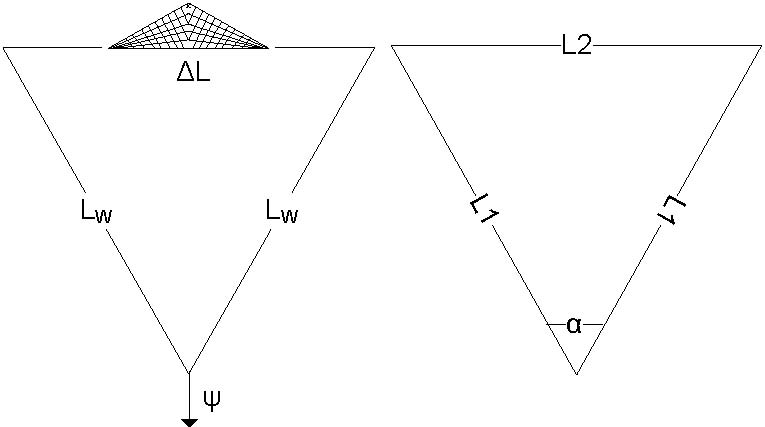
The image shows how the trajectory of the vessel is defined. Basically, the total length of the trajectory, \(L\), is found as
\[L = L1 + L2 + L1\]
, where L1 and L2 are the sides of the isosceles triangle, with apex angle \(\alpha\) at the start, that forms the path of the vessel.
Further we have that:
\[ L = L_1 + L_2 + L_1 \]
\[ L = 2L_W + \Delta L \]
\[ sin \frac{\alpha}{2} = \frac{\frac{L_2}{2}}{L_1} \]
Combining these equations, we get:
\[ L_2 = \frac{L}{1+\frac{1}{sin \frac{\alpha}{2}}} \]
\[ L_1 = \frac{L_2}{2 sin \frac{\alpha}{2}} = \frac{L - L_2}{2}\]
Using these equations, the trajectory of the vessel is found based on the input ( \( L_W, \Delta L, \psi, \alpha \) ).
The calculations of vessel heading are trivial and not explained in detail, but the headings are found based on the specified final heading and spread angle.
The example is a copy of the regression input tests/in/SeineOperation/SeineOperation_in.xml, so the two cannot drift apart silently. Seine/Cable is wired to these objects in SeineCable.xml (FISH-0017, resolved).
This SimObject is referred to as Seine/Operation
 1.9.8
1.9.8